

11 Best AI Writing Apps for Students in 2026 (Tested & Compared)
August 05, 2026

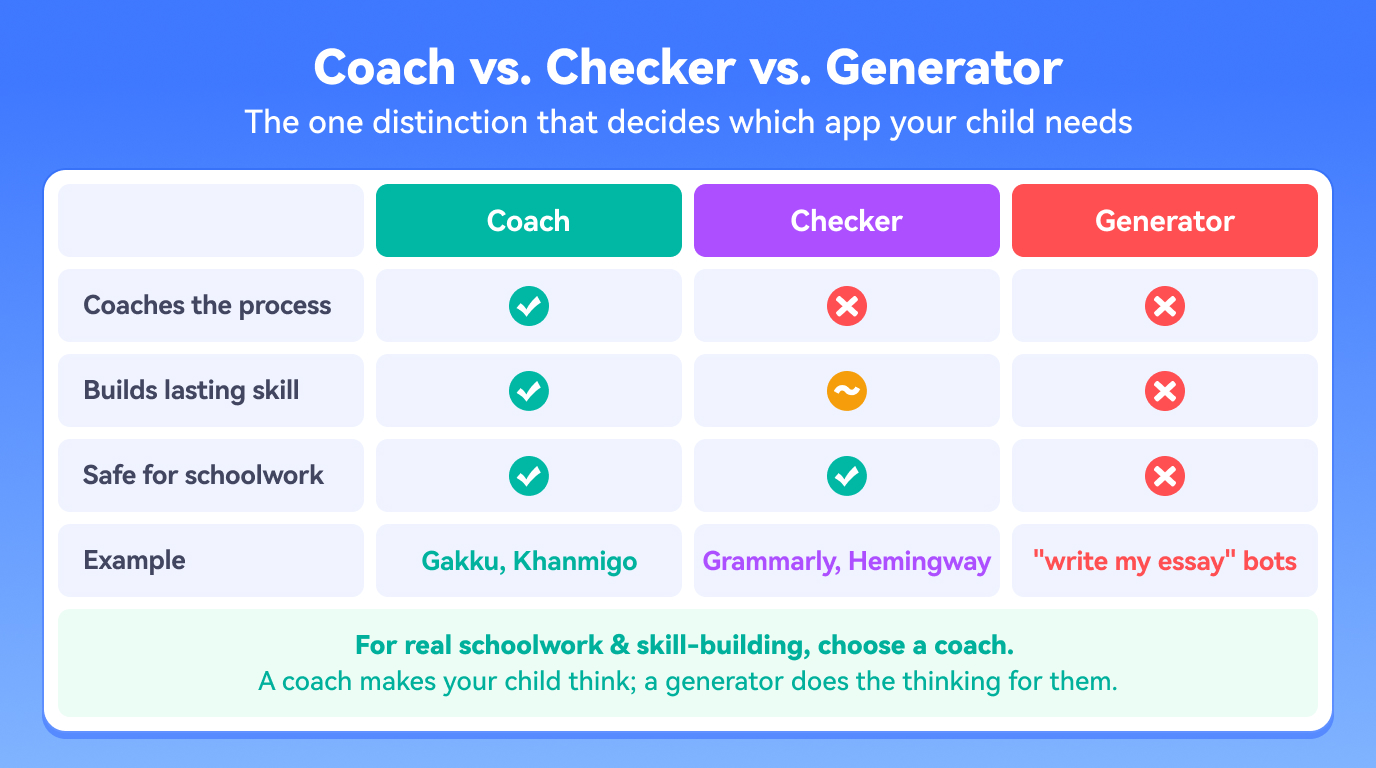
Talking with families every week, I hear the same worry over and over: a child pastes the assignment into ChatGPT, changes a few words, and turns in something they can’t actually explain. It’s a completely reasonable fear — and I want to reassure you, because the solution is simpler than it feels. “AI writing app for students” is not one thing. Some are coaches that guide a child to write and think; some are checkers that clean up a finished draft; and some are generators that produce the essay for them. Those three do very different things to your child’s skills. Below, I’ve compared the 11 most-recommended AI writing tutors for K-12, told you plainly which type each one is, and given you a clear pick for every need, age, and budget — so you can choose with confidence, not anxiety.
What is an AI writing app for students?
An AI writing app for students is software that uses AI to help a young writer improve — but the category splits into three meaningfully different kinds of tool. A grammar checker corrects surface errors (spelling, punctuation, style) in a draft the child has already written. A writing coach or curriculum guides the child through the whole process — choosing a topic, forming a claim, supporting it with evidence, organizing paragraphs, and revising — so the underlying skill grows over time, not just the single document. A text generator produces writing for the child from a prompt. For schoolwork, coaches build skill, checkers polish it, and generators tend to replace it. Knowing which one your child actually needs is the whole decision, and it’s the lens I use for every tool below.
Why the type of app matters more than the brand
Here’s the reassuring part, backed by research: the biggest gains in kids’ writing come when feedback targets the thinking — argument, organization, and evidence — and pushes the child to revise, not when it simply fixes commas or hands over finished text. A 2026 study even found that purpose-built tools that guide specific steps of writing outperformed general chatbots like ChatGPT and kept students more connected to their own ideas. So the app that makes your child do the thinking is worth far more than one that does the thinking for them — regardless of how famous the brand is.
How we chose
I compared the most-recommended AI writing apps for students against five criteria that matter for a learner (not a professional writer):
Coaches process vs. produces output — does it help the child write, or write for them?
Feedback depth — does it coach reasoning and structure, or only flag grammar?
Age & standards fit — built for K-12, and mapped to standards like Common Core?
Ease of use — can a child actually use it independently?
Price & access — free, freemium, or paid; and is there a trial?
Each tool below has a quick-spec line (ages, platforms, cost, best-for), a short honest assessment, and a one-line standout feature so you can scan and compare fast.
The 11 best AI writing apps for students, compared
Gakku.AI — best full writing coach
Ages: K-12 (~grades 3-11) | Platforms: iOS, Android, Web | Cost: $29.90/mo or $269/yr, 3-day free trial | Type: Coach | Best for: a child who needs coaching through the whole essay, not a quick fix
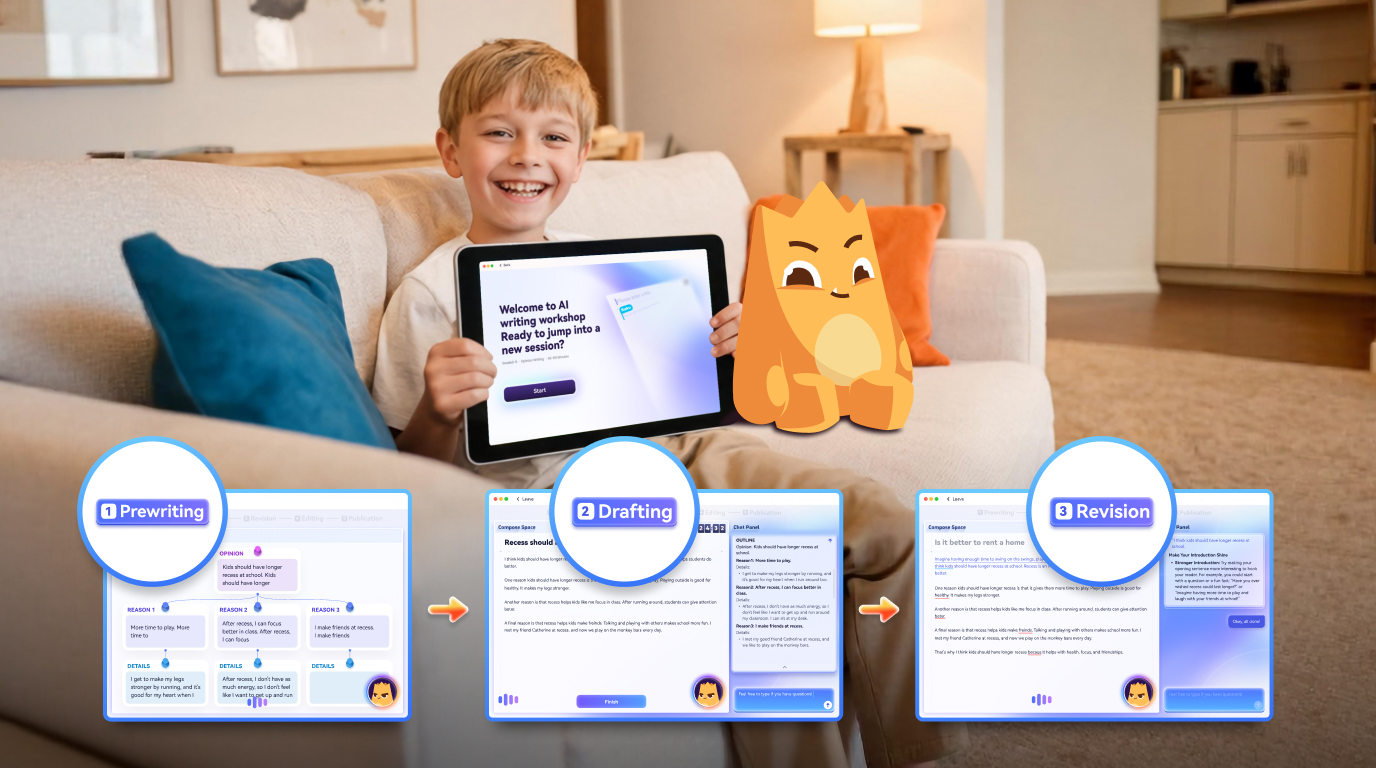
Gakku.AI is an AI writing tutor built for K-12 students rather than for one-off editing — and it’s the one I point families to when they want their child coached, not corrected. Its AI companion, Raku, guides a child from a blank page to a polished draft through Lesson Map Challenges and a mission-based AI Writing Workshop, with Lesson Cards that teach one skill at a time — writing a hook, expanding sentences, choosing precise words, adding transitions, and building an argument with cards like “Strong Reasons” and “Support Your Reasons.” There’s even a Talk & Learn mode where a child reasons out loud in real-time voice conversation with Raku. The curriculum aligns to Common Core, CEFR, and GCSE, and gentle gamification — earning Gems from challenges to customize Raku (and the upcoming Cabin space) — keeps kids coming back through the hard part: revision. It’s a premium tool, so it’s the pick when you want structured coaching; the 3-day free trial lets you feel the difference first.
Standout feature: Raku coaches your child’s own writing and reasoning — giving feedback on structure and argument during drafting — but never writes the essay for them, which is exactly what makes it safe for real schoolwork.
Quill.org — best free grammar & sentence practice
Ages: Grades 4-12 | Platforms: Web | Cost: Free (nonprofit) | Type: Checker/practice | Best for: targeted grammar and sentence drills at no cost
Quill.org is a free, nonprofit platform used widely in classrooms for grammar and sentence-level practice. Its activity-based tools give instant feedback on focused skills, and teachers can assign and track work. It’s genuinely free, which is why it’s so widely recommended — its limit is scope: it’s built for drills, not for coaching a full essay.
Standout feature: completely free, adaptive sentence-level exercises with instant feedback — ideal as a supplement, not a full curriculum.
Grammarly — best for polishing a finished draft
Ages: Teen-adult | Platforms: Web, browser, desktop, mobile | Cost: Free tier + premium | Type: Checker | Best for: a final proofreading pass on a completed draft
Grammarly is the best-known general writing assistant, and it’s excellent at catching grammar, punctuation, clarity, and tone in a draft that’s already written. For an older student it’s a strong final-pass proofreader. The caveats for a learner: it’s mechanics-focused, it doesn’t teach the writing process or map to a standard, and its generative features can drift toward writing for the student if used carelessly.
Standout feature: real-time corrections anywhere you write — best treated as a polish step after the thinking is done.
Khanmigo — best free guided feedback for classrooms
Ages: K-12 | Platforms: Web | Cost: Free for U.S. teachers, ~$4/mo families | Type: Coach | Best for: guided, tutor-style feedback inside a class
Khan Academy’s Khanmigo offers guided, Socratic-style feedback and gives teachers visibility into each student’s process — and it’s free for U.S. teachers. It prompts students with questions instead of rewriting their work. A strong classroom choice; the gap for families is that it isn’t a standalone, standards-mapped curriculum to run at home.
Standout feature: teacher insight into each student’s process, free for U.S. educators — coaching rather than correction.
Night Zookeeper — best for younger, reluctant writers
Ages: ~6-12 | Platforms: Web, apps | Cost: Subscription with free trial | Type: Coach (gamified) | Best for: turning writing-averse elementary kids into willing writers
If your child dreads writing, Night Zookeeper is often the breakthrough. It wraps writing practice in an imaginative game world, so younger children write willingly, earn rewards, and get feedback from a moderated team. It’s less about essay structure or standards and more about building the habit and joy of writing in the early grades.
Standout feature: genuinely fun, game-based challenges that get reluctant 6-12 year-olds writing regularly — motivation first, structure second.
QuillBot — best for paraphrasing
Ages: Teen-adult | Platforms: Web, browser | Cost: Free tier + premium | Type: Generator/rewriter | Best for: rewording and summarizing existing text
QuillBot is popular for paraphrasing, summarizing, and quick rewrites. The caution for students: because it rewrites text rather than coaching a child to improve their own, it builds little durable skill — and for younger learners, rewriting tools can shade into doing the assignment for them. A study aid for older students, a crutch if unsupervised.
Standout feature: fast, flexible paraphrasing — a study utility, not a way to learn to write.
NoRedInk — best standards-aligned school practice
Ages: Grades 3-12 | Platforms: Web | Cost: School/district license | Type: Coach/practice | Best for: schools wanting adaptive, standards-aligned practice with data
NoRedInk builds writing and grammar skills through adaptive practice tied to Common Core and state standards, using topics students care about, with teacher dashboards. A genuine skill-builder — its constraint is that it’s a school purchase, not a consumer app.
Standout feature: adaptive practice tagged to specific standards with teacher data — powerful for schools, not sold to individual families.
ProWritingAid — best deep style & structure editing
Ages: HS-adult | Platforms: Web, desktop, integrations | Cost: Free tier + premium | Type: Checker (advanced) | Best for: older students who want detailed feedback on style and structure
ProWritingAid offers detailed reports on style, readability, sentence variety, pacing, and overused words. For a motivated high-schooler willing to read its explanations, it can teach editing habits — but it’s still an editing tool for existing drafts, and its depth can overwhelm younger writers.
Standout feature: in-depth writing reports that can teach self-editing to older, motivated students.
Hemingway Editor — best for clarity & readability
Ages: Teen-adult | Platforms: Web (free), paid app | Cost: Free web + paid app | Type: Checker | Best for: tightening wordy writing into clear prose
Hemingway highlights long, dense sentences, passive voice, and complex phrasing, and gives a readability grade — a simple, visual way to teach concision, with a free web version. It does one thing well and nothing else.
Standout feature: color-coded readability highlighting that teaches shorter, clearer sentences at a glance.
Write & Improve — best free CEFR-scored practice
Ages: Teen-adult | Platforms: Web | Cost: Free | Type: Practice | Best for: independent learners wanting instant CEFR feedback
Cambridge’s Write & Improve gives free, instant feedback mapped to CEFR levels — credible and useful for English learners tracking progress. Feedback is lighter-touch than a full coach, and it’s aimed at older or self-directed learners.
Standout feature: free, instant CEFR-level scoring from Cambridge — a trustworthy progress benchmark for English learners.
Writable — best full-process writing with rubrics
Ages: Grades 3-12 | Platforms: Web (HMH) | Cost: School license | Type: Coach (classroom) | Best for: teachers assigning full writing tasks with standards-based rubrics
Writable supports the entire writing process — assignments, drafts, peer review, and AI-assisted feedback tied to rubrics — inside a teacher’s workflow, so students revise toward specific criteria. A classroom/district product rather than a consumer app.
Standout feature: rubric-aligned feedback across the full draft-and-revise cycle, built into the teacher’s workflow.
How to choose the right one (by need)
You want a real writing coach for your child at home: Gakku.AI.
You need free grammar/sentence practice: Quill.org.
Your child is young and resists writing: Night Zookeeper.
You just want to polish a finished draft: Grammarly (or Hemingway for clarity, ProWritingAid for depth).
You’re a teacher wanting free guided feedback: Khanmigo; for standards-tagged practice, NoRedInk or Writable.
You want free CEFR-scored practice for an older/EL learner: Write & Improve.
You only need paraphrasing: QuillBot (with supervision for younger students).
How to choose by age
Elementary (grades K-5): prioritize motivation and guided structure. Night Zookeeper for reluctant writers; Gakku.AI for coaching the process as reading and writing mature.
Middle school (grades 6-8): this is where process coaching pays off most — Gakku.AI for full idea-to-draft coaching, Quill.org for free drills, Khanmigo in class.
High school (grades 9-12): add editing depth — Gakku.AI or Khanmigo for coaching, ProWritingAid or Grammarly for polishing, Write & Improve for EL benchmarking.
What to avoid
I’ll be honest with you: be cautious with any tool your child uses to generate finished text for an assignment. The essay may look good, but the learning — and their ability to explain their own work — is gone, and it raises academic-integrity risks. The healthiest pattern is simple, and it’s the one that lowers everyone’s stress in the long run: your child writes the first draft in their own words, the AI gives feedback, and your child revises. Choose tools built for that loop, and treat “write this for me” features as off-limits for schoolwork.
FAQ
Which AI writing app actually coaches students instead of just fixing grammar?
Tools built as writing curricula — like Gakku.AI, with its Raku coach, plus classroom coaches like Khanmigo, NoRedInk, and Writable — guide students through planning, drafting, and revising, whereas checkers like Grammarly, Hemingway, and QuillBot mainly correct or rewrite a finished draft.
Is there an AI writing app that offers essay feedback for a low monthly price?
Quill.org and Khanmigo (free for teachers) are the lowest-cost. Gakku.AI is a premium coaching app at $29.90/month with a 3-day free trial, so you can test the full coaching experience before paying.
What’s the best free AI writing tool for students?
Quill.org for grammar and sentence practice, Write & Improve for CEFR-scored practice, and Hemingway’s free web version for clarity. Khanmigo is free for U.S. teachers. Full guided coaching is typically a paid feature.
What’s the best AI writing app for elementary kids who hate writing?
Night Zookeeper, which gamifies writing for ages 6-12, is the usual recommendation for motivation; Gakku.AI adds structured coaching as a child’s reading and writing develop.
Do AI writing apps help kids cheat?
It depends on the tool’s design. Generators produce finished text; coaching apps like Gakku.AI guide the child’s own writing and revision rather than write the essay for them, which is why they’re a safer fit for schoolwork.
Which apps align with Common Core?
Gakku.AI (CCSS, CEFR, GCSE), NoRedInk, and Writable are the standards-aligned picks. Most general grammar checkers do not map to a specific standard.
Can these apps replace a writing teacher or tutor?
No — think of them as a complement to good teaching, not a substitute. Their value is scale: giving your child far more feedback and revision practice than a busy teacher can provide one-on-one.
Want to see what a real writing coach feels like for your child — before you commit a cent? Meet Raku and try a Lesson Map free.